From Exposed elFinder to Remote Code Execution: How an Unauthenticated File Manager Led to Server Compromise
- Attack Surface
- Offensive Security
- Red Teaming

A critical server compromise does not always require a zero-day or a critical software vulnerability. Sometimes, an exposed administrative tool is enough.
During an authorized penetration test of client assets, Velstadt’s offensive security team identified a critical exposure that could allow an external attacker to fully compromise a server and reach sensitive data.
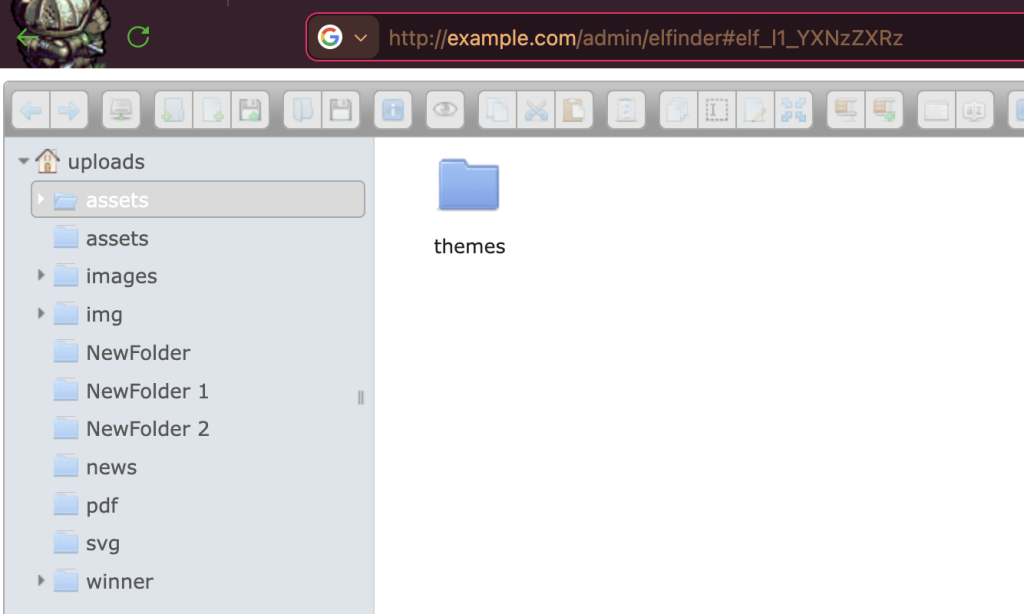
While mapping the external attack surface, our team discovered an additional public resource that exposed the web file manager elFinder without any authentication. Because elFinder provides direct file system management features, an unauthenticated user could browse server directories, view and edit files, and upload arbitrary content.
In practice, this meant the application itself became the exploitation mechanism, without the need for complex vulnerability research.
This anonymized case study explains how the exposure was discovered, how remote code execution was validated, and what security teams should do to prevent similar findings in their own environments.
TL;DR — Key Takeaways
- Finding: An unauthenticated elFinder web file manager was publicly accessible.
- Impact: An attacker could browse directories, edit files, upload arbitrary content, and execute code on the server.
- RCE Validation: A PHP web shell was uploaded to a web-accessible directory, confirming command execution under the permissions of the web service account.
- Post-Exploitation Risk: The team demonstrated an interactive reverse shell and SSH key-based persistence.
- Credential Exposure Paths: Database credentials were recovered from
wp-config.php,while publicphpinfo()files exposed environment and configuration information useful to attackers. - Sensitive Data Exposure: The team accessed two databases containing password hashes for administrative accounts, confidential user information, and other internal records.
- Severity: Critical. The combination of no authentication, low exploitation effort, remote code execution, persistence, and database access could lead to full host compromise.
- Root Cause: A powerful administrative file-management component was published without proper access control, while executable uploads, debug artifacts, and server-side secrets were not sufficiently restricted.
The Engagement Context
The target environment included public-facing web assets that were in scope for an authorized penetration test. The objective was to identify externally reachable weaknesses that could create material business risk, including unauthorized access, data exposure, server compromise, and potential paths to deeper infrastructure impact.
In this case, the key risk came from an administrative file manager exposed to the internet without authentication.
Technical Breakdown
Step 1 — Reconnaissance: Discovering the Exposed File Manager
The exposed elFinder instance was identified during reconnaissance as an additional public resource within the assessed attack surface.
What made this finding immediately high-risk was the level of functionality available without authentication. The interface exposed file-system operations normally reserved for trusted administrators: directory browsing, file viewing, file editing, and file upload.
From an attacker’s perspective, this type of exposure removes much of the uncertainty from exploitation. Instead of searching for a complex application vulnerability, the attacker can use the exposed administrative functionality directly.
In other words, the issue was not only that an administrative interface was visible. The issue was that it provided enough control over the file system to become a direct path to exploitation.
Step 2 — Validating Remote Code Execution
To validate the real business impact, the team used the exposed file manager to upload a PHP web shell into a web-accessible directory.
Once the file was reachable through the web server, it was possible to execute commands on the host under the permissions of the web service account. This confirmed that the issue was not limited to unauthorized file access or file modification. It resulted in remote code execution.
From a real-world attacker perspective, this is the turning point where the incident shifts from a “website issue” to a “server breach.” Code execution can enable data theft, persistence, privilege escalation, and potential lateral movement where credentials and network paths permit.
The confirmed issue should be described precisely: remote code execution through an exposed file manager and executable file upload. Unless a specific vulnerable elFinder version or CVE is confirmed, the article should not claim that elFinder itself contained an RCE vulnerability.

Step 3 — Demonstrating Persistence Risk
After establishing initial execution capability through the uploaded web shell, we demonstrated how an attacker could maintain longer-term access to the compromised host.
Within the agreed scope of the engagement, the web shell was used to initiate an outbound connection from the affected server to a controlled testing host, resulting in an interactive reverse shell. The team then added an SSH public key to enable SSH-based access where the SSH service was reachable.
This persistence path is particularly dangerous because removing the exposed web component alone may not remove attacker access. If host-level changes are not reviewed, unauthorized SSH keys, web shells, modified files, or other persistence artifacts may remain after the initial web application issue is fixed.
Detection should therefore include both outbound reverse-shell behavior and host-level indicators such as changes to authorized_keys, unusual SSH logins, suspicious file modifications, and unexpected processes spawned by the web service account.
Step 4 — Accessing Sensitive Databases
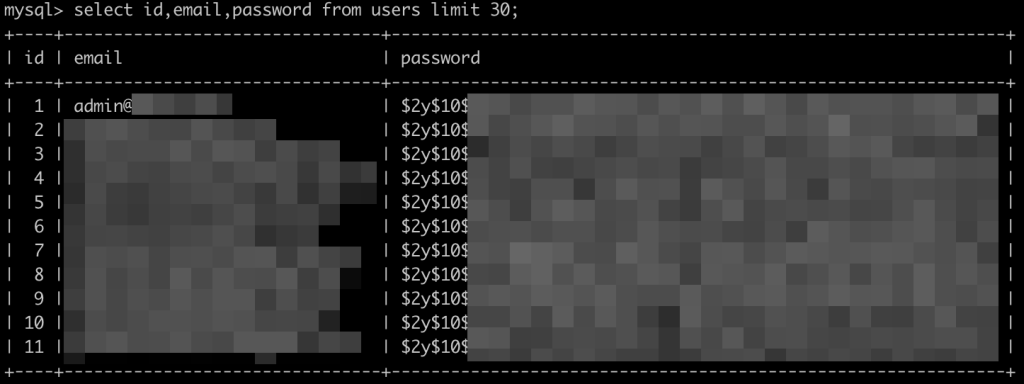
During further post-exploitation activity, we were able to access two databases containing sensitive information.
The data observed included password hashes for administrative accounts, confidential user information, and other internal records. The database credentials required to authenticate to these systems were recovered through multiple exposure paths on the server.
In particular, the WordPress configuration file wp-config.php contained database access details, while publicly accessible phpinfo() files revealed environment and configuration information that can significantly assist attackers in locating secrets, understanding the server layout, and identifying connected services.
Even when password hashes are stored instead of plaintext passwords, they still represent a serious risk. Attackers may attempt to crack them offline, use recovered passwords in credential-stuffing attacks, or support privilege escalation across the environment. Administrative password hashes are especially valuable because cracked or reused administrator passwords may provide access to higher-impact systems.
Why This Finding Matters
This finding was classified as Critical because it combined three high-risk conditions: public unauthenticated access, executable file upload, and confirmed command execution on the server.
The impact extended beyond file management. The team demonstrated persistence risk and accessed sensitive databases, which means this issue could support full host compromise in a real-world attack scenario.
From a risk perspective, this exposure could lead to:
- Complete compromise of the affected host.
- Theft or manipulation of user data.
- Exposure of administrative password hashes and database credentials.
- Service disruption.
- Deployment of additional malicious tools.
- Further compromise of connected systems if shared credentials or trusted network paths exist.
This is the kind of finding that security teams should treat as a breach-enabling condition, not simply as a web application misconfiguration.
See What Your External Attack Surface Really Exposes
Velstadt’s Offensive Security team helps organizations validate how internet-facing assets can be abused in real-world attack scenarios, from exposed services and access-control gaps to chained exploitation paths.
Severity Classification
A formal CVSS score should be calculated based on the exact production context, exposed attack surface, privileges, confirmed impact, and environmental factors. However, based on the confirmed exploitation path, this issue fits a Critical severity rating.
| Severity Factor | Assessment |
|---|---|
| Attack Vector | Network |
| Attack Complexity | Low |
| Privileges Required | None |
| User Interaction | None |
| Confirmed Impact | Remote code execution, persistence, database access |
| Confidentiality Impact | High |
| Integrity Impact | High |
| Availability Impact | Potentially High |
| Business Risk | Full host compromise and sensitive data exposure |
Root Cause Analysis
The exploit path was enabled by several control failures.
1. Public Exposure of an Administrative File Manager
The elFinder instance was accessible from the internet without authentication. Because file managers provide high-risk administrative functionality, they should not be exposed publicly without strong access control.
2. Executable Uploads to a Web-Accessible Directory
The exposed file manager allowed a PHP file to be uploaded into a location where it could be executed by the web server. This transformed file upload capability into remote code execution.
3. Insufficient Separation Between Managed Files and Executable Paths
Uploaded or managed content should not automatically become executable server-side code. Environments should separate user-manageable files from executable application paths wherever possible.
4. Exposed Configuration and Debug Artifacts
The presence of accessible configuration data and public phpinfo() pages increased the attacker’s ability to discover secrets, understand the environment, and access connected databases.
5. Insufficient Detection of Post-Exploitation Activity
The ability to upload a web shell, establish a reverse shell, and add SSH-based access highlights the need for effective file integrity monitoring, outbound connection monitoring, and administrative activity detection.
Technical Remediation Guide
1. Remove or Restrict Public Access to elFinder
The exposed elFinder instance should be disabled or removed from public access immediately.
If the tool is still required for business or administrative purposes, access should be restricted to authenticated administrators only. Ideally, it should be placed behind a VPN, Zero Trust access layer, or strict IP allow-listing, with MFA enforced wherever possible.
Recommended actions:
- Remove public access to the elFinder instance.
- Require strong authentication and MFA for administrative access.
- Restrict access by network location where possible.
- Review whether the tool is still needed in production.
- Disable the component entirely if there is no approved operational requirement.
2. Prevent Executable File Uploads
Upload and edit capabilities must be hardened so that executable content cannot be placed in web-accessible directories.
Recommended actions:
- Enforce a strict allow-list of permitted file types based on business need.
- Block server-side executable file types such as
.php,.phtml,.phar,.cgi,.pl,.jsp, and similar formats depending on the technology stack. - Store uploaded files outside the web root where possible.
- Configure the web server to prevent script execution in upload and user-managed directories.
- Validate file extension, MIME type, and file content server-side.
- Do not rely on client-side validation as a security control.
3. Remove phpinfo() and Debug Artifacts from Production
Public phpinfo() pages and debug files should not exist in production environments. They may disclose environment variables, paths, modules, server configuration, and other information that helps attackers refine exploitation.
Recommended actions:
- Remove public
phpinfo()files. - Search the web root for debug scripts, test files, backups, and temporary files.
- Disable verbose production diagnostics.
- Ensure sensitive configuration details are logged only in protected backend systems.
- Review deployment processes to prevent debug artifacts from reaching production.
4. Protect Configuration Files and Secrets
Because the compromise path enabled credential exposure, all potentially affected secrets should be treated as compromised.
Recommended actions:
- Rotate database passwords.
- Rotate administrative credentials.
- Rotate application secrets and API tokens.
- Review WordPress and plugin configuration files for exposed credentials.
- Move secrets to a dedicated secrets management solution where possible.
- Restrict file permissions so the web service account cannot access unnecessary secrets.
5. Hunt for Persistence and Web Shells
Removing the exposed file manager is not enough if an attacker already used it.
Security teams should review the affected host for persistence mechanisms, unauthorized SSH keys, modified files, suspicious PHP scripts, scheduled tasks, unknown services, and abnormal outbound connections.
Recommended actions:
- Search web directories for recently created or modified executable files.
- Review SSH
authorized_keysfiles for unauthorized entries. - Check system users, cron jobs, services, and startup scripts.
- Review web server logs for web shell access patterns.
- Review outbound network connections from the server.
- Use EDR where available, SIEM, and file integrity monitoring to support investigation.
6. Improve Detection and Monitoring
Detection should focus on both the initial abuse and the post-exploitation activity that follows.
Recommended detections:
- File creation or modification in web-accessible directories.
- Upload of executable file extensions.
- Web server execution of unusual PHP files.
- Unexpected outbound connections from the web server.
- Reverse shell-like network behavior.
- SSH logins from unusual sources.
- Unauthorized changes to SSH
authorized_keysfiles. - Access to
wp-config.phpor other configuration files. - Public access attempts to
phpinfo()or debug endpoints.
A WAF can help detect suspicious requests and exploitation attempts, but it should not be treated as the primary fix. The primary remediation is to remove public administrative exposure, enforce authentication, and prevent executable uploads.
Monitor Your Environment 24/7/365
Velstadt SOC-as-a-Service delivers 24/7/365 threat detection, investigation, and response across endpoints, servers, cloud workloads, identity platforms, and network-facing assets.
Risk-Based Remediation Priorities
Priority 1 — Contain the Active Risk
- Disable or restrict the exposed elFinder instance.
- Remove web shells and suspicious executable files.
- Disable script execution in upload and user-managed directories.
- Rotate database passwords, administrative credentials, and other potentially exposed secrets.
- Review SSH access and remove unauthorized keys.
- Review recent outbound connections and unusual processes from the affected host.
Priority 2 — Clean Up the Exposure
- Remove public
phpinfo()pages, debug files, backups, and test artifacts. - Review web root permissions and configuration file access.
- Validate that similar administrative tools are not exposed elsewhere.
- Restrict administrative interfaces behind strong authentication, MFA, IP allow-listing, VPN, or Zero Trust Access where appropriate.
- Review and tune WAF or edge-layer rules to detect and block suspicious file upload, web shell, and exploitation attempts as part of a long-term defense-in-depth strategy. These controls should complement, not replace, application and server-side fixes.
Priority 3 — Investigate and Harden
- Review logs for signs of prior exploitation.
- Investigate suspicious file changes, outbound connections, unusual SSH activity, and unexpected processes spawned by the web service account.
- Retest the affected path after remediation.
- Use EDR where available to support host-level investigation and detect web shell or reverse shell behavior.
- Integrate relevant host, web server, SSH, database, EDR, WAF, and access-control logs into SIEM.
- Add file integrity monitoring for critical web directories and configuration files.
Business Impact
A finding like this can create more than a technical incident. If sensitive personal data, administrative credentials, or customer records are exposed, the organization may need to perform a formal breach assessment depending on its jurisdiction, contractual obligations, industry, and data categories.
From a business perspective, unauthenticated access to a file manager that leads to remote code execution, persistence, and database access should be treated as a serious risk. It may affect incident response, customer trust, contractual obligations, regulatory assessment, and business continuity.
The exact compliance impact depends on the affected data, systems, geography, and regulatory scope. Security teams should involve legal, compliance, and incident response stakeholders when sensitive data or privileged access is confirmed.
FAQ
Is this an elFinder vulnerability?
Not necessarily. Based on the confirmed evidence, the safer wording is that an exposed elFinder instance led to remote code execution. Unless a specific vulnerable elFinder version or CVE is confirmed, the article should not claim that elFinder itself contained a software vulnerability.
In this case, the confirmed risk came from deployment and access-control conditions: the file manager was reachable without authentication, allowed file-system operations, and enabled upload of executable content into a web-accessible location.
Why is phpinfo() dangerous in production?
phpinfo() can expose configuration details, environment information, enabled modules, file paths, PHP settings, server variables, and other technical data that helps attackers understand the system.
On its own, a public phpinfo() page may not provide direct compromise. However, during exploitation it can help attackers identify application paths, loaded extensions, environment-specific configuration, and connected services. This information can make it easier to locate secrets, understand the server layout, and refine follow-on attacks.
Are password hashes really sensitive?
Yes. Password hashes are sensitive even when plaintext passwords are not exposed. Attackers can use open-source cracking tools and wordlists to attempt offline password recovery, especially when weak passwords, reused passwords, or outdated hashing algorithms are involved. If a password is recovered, it can be used for credential stuffing, privilege escalation, or access to other systems where the same password was reused.
In some environments, stolen hashes may also support hash-based authentication attacks, such as Pass-the-Hash in Windows infrastructure. That is why administrative password hashes should be treated as high-risk secrets and investigated as part of credential exposure.
References and Sources
- OWASP Web Security Testing Guide
- OWASP File Upload Cheat Sheet
- OWASP Top 10 2025: A01 — Broken Access Control
- OWASP Top 10 2025: A02 — Security Misconfiguration
- CWE-434: Unrestricted Upload of File with Dangerous Type
- CWE-306: Missing Authentication for Critical Function
- CWE-200: Exposure of Sensitive Information to an Unauthorized Actor
- MITRE ATT&CK: T1190 — Exploit Public-Facing Application
- MITRE ATT&CK: T1059 — Command and Scripting Interpreter
- MITRE ATT&CK: T1505.003 — Server Software Component: Web Shell
- MITRE ATT&CK: T1098.004 — Account Manipulation: SSH Authorized Keys
- FIRST: CVSS v3.1 Specification Document
- NIST SP 800-115: Technical Guide to Information Security Testing and Assessment

News & Insights
More from our security team
Deep dives, incident analysis, and threat intelligence.